Most people who ask me how to start vinyl cutting at home are asking the wrong question. They want to know which machine to buy. The machine is the easy part. Beginner vinyl cutting machines are the cheapest thing in this hobby, and everything surrounding them, the mats, the blades, the transfer tape, the subscription pop-up that appears mid-project, is where the money actually goes.
I ran an Etsy sticker and vinyl shop for six years out of a spare bedroom in Nashville while raising two kids. I have cut through more than 200 rolls of vinyl, dulled a small mountain of blades, and kept a notebook of pressure settings and material thicknesses the way other people keep a grocery list. I own three machines: an old Explore that still runs, a Maker 3, and a borrowed competitor unit I keep around for comparison.
So this is the guide I wish someone had handed me on day one. Two machines worth your money, the accessories you actually need, and a step-by-step workflow that takes you from a blank mat to a finished decal in an afternoon.
Why you should trust me
I teach craft classes on weekends now, and the pattern in every class is identical. Someone shows up with a machine they bought in a bundle, they have owned it for three months, and they have never made a single test cut. They blame the machine for tearing vinyl. It is almost never the machine.
What I do for a living is turn vinyl into money, which means I care about cost per cut and blade life more than I care about which logo is on the housing. I buy third-party mats. I buy third-party blades. I have run both brands in the machines below, and I will tell you plainly that the hardware from either company is fine and the accessory aisle is where both of them make their margin.
One ground rule before we start: this is not a tribe article. Cricut and Silhouette both make hardware that works. If you want a fight about which brand is better, you are in the wrong shop.
How I picked and how I tested
I keep one test file for every machine that comes through my house. It has three jobs in it: a three-inch kiss-cut circle, a one-inch name in a script font, and a four-inch HTV decal with a couple of thin interior cuts. That file tells me most of what I need to know.
The kiss-cut circle shows me whether the machine holds a consistent blade depth across the mat. The script name shows me whether the software handles small text without me fighting it. The HTV decal shows me how the machine handles a mirrored cut and how clean the weeding is afterward.
I also look at three things that never show up in a spec sheet. First, whether the software lets me set a custom material profile without a paid tier, because I cut materials that are not on anyone's preset list. Second, how loud the machine is in a small room, since I cut at night after my kids go to bed. Third, how easy the blade housing is to swap, because blades are the part that fails most often and I do not want to fight a plastic clip at 11 p.m.
I did not run a lab. I ran the same three cuts on both machines, weeded all of them by hand, and noted where I had to slow down. That is the same process I use when a student brings me a machine that is "broken."
The two machines I would put on a beginner table
If you want to cut stickers, labels, small decals, and the occasional shirt, you do not need a wide-format machine and you do not need every tool Cricut or Silhouette sells. You need one machine, one mat, and a blade. Here are the two I would hand a beginner.
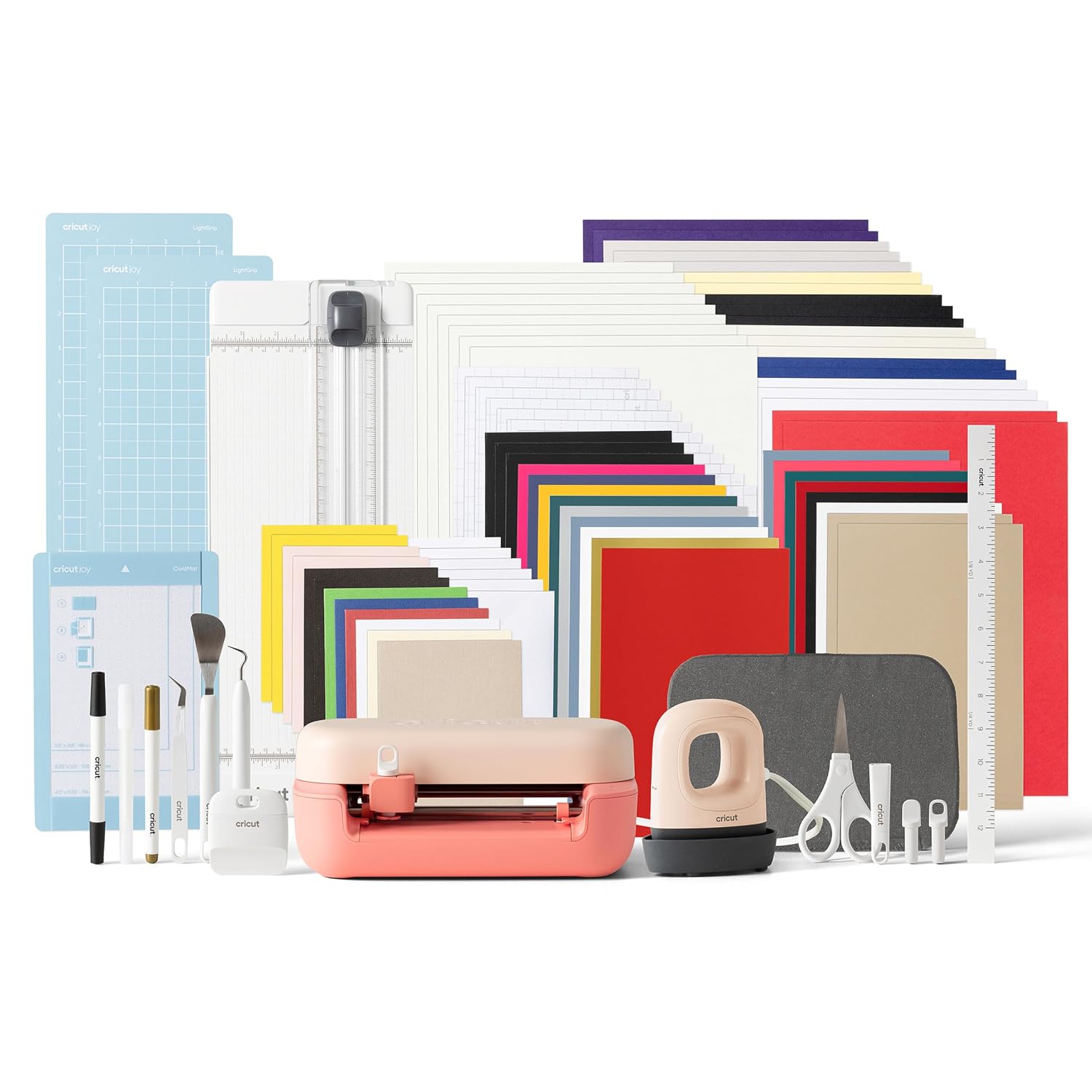
The bundle pick: Cricut Joy™ 2 + Ultimate Bundle, Coral
 Visit on Amazon →
This is the one I recommend to the parent who wants to make labels, birthday cards, and stickers with their kids and does not want to assemble a shopping list first. The bundle is the whole point: you get the machine plus the materials and tools that a beginner would otherwise have to figure out one piece at a time, which is where most people quit. The Coral color is a small thing, but it is a machine that lives on a kitchen counter instead of a closet shelf, and that matters more than people admit.
It is a small-format machine, and I want to be honest about what that means. Big apparel designs that need a wide mat are not its job. Small and medium cuts are, and it does those well. The software side is the part I complain about: it is cloud-dependent, it wants an internet connection, and it will wave the paid tier at you while you are in the middle of a project. Turn off the pop-ups in settings on day one and you will be happier.
Flaws but not dealbreakers: The mat that comes with it is a consumable, not a permanent tool. Plan on replacing it and plan on buying third-party when you do. Mine lose their stickiness long before they lose their shape.
Anyone who wants a low-fuss first machine, a contained accessory kit, and a small footprint will get the most out of this.
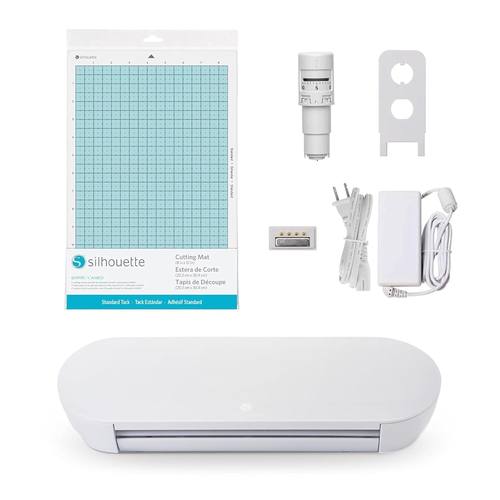
The step-up pick: Silhouette Portrait 4-9 inch Vinyl Cutting Machine with Studio Software, PixScan, Electric Tool and ES Mat Compatible, SNA and IPT Enabled, 50 db
 Visit on Amazon →
This is the machine I point people toward when they tell me they already know they want to design their own files and they do not want to be nudged toward a subscription every time they open the software. The Studio software is a real design program, not a simplified app, and the free tier covers the cutting most hobbyists will ever do. That is the difference that matters to me, because I have watched too many beginners get talked into a monthly fee before they have made their tenth sticker.
The features baked into the name are the ones I actually use. PixScan lets you photograph a printed sheet or a scrap of material and cut around what is already on it, which is how I cut around pre-printed sticker sheets and odd-shaped offcuts. ES mat compatibility means you are not locked into one company's mats, and since mats are the accessory I burn through fastest, that is real money over a year. The name advertises 50 db, and in a small apartment at night that quiet operation is worth more than any extra cutting force I will never use.
The tradeoff is the community. Cricut has a decade of tutorials for every material you can name. Silhouette's tutorial ecosystem is smaller, so you will be reading more documentation and watching fewer step-by-step videos. That is a real cost in time.
Flaws but not dealbreakers: The software is more powerful and therefore less forgiving. If you have never used a vector design tool, budget an evening with the manual before your first project. The paid upgrades exist here too, they are just not shoved at you.
Anyone who wants to design their own files, cut around printed artwork, and use third-party mats should look here first.
What you actually need before your first cut
Here is the honest starter list. Everything past the first three items is optional for your first month.
- One machine. Pick from the two above. Do not buy two.
- One mat. The machine comes with one. Buy replacements from a third party when it stops gripping, not before.
- A fine-point blade and one spare. Blades dull faster than the packaging admits, and most "machine problems" are blade problems. A fresh blade fixes cuts that suddenly stop separating cleanly.
- A weeding set. A hook, a pair of tweezers, and a scraper. Buy the cheap third-party set. The brand-name version is the same steel with a different handle.
- A small sampler of vinyl and HTV. Not the twelve-roll rainbow. Buy a few sheets of the colors you will actually use and learn on those.
- Transfer tape for adhesive vinyl. This is the step beginners skip and then wonder why their decal folds onto itself.
- Something to apply heat if you are doing HTV. A home iron works in a pinch. A heat press is better, but it is a second purchase, not a first one.
The mat and the blade are consumables. Treat them like printer ink and you will not be surprised when they wear out.
The actual workflow, step by step
This is the process I run on every new material, and it works on either machine.
Step one: Pick a small first project. A kiss-cut sticker sheet is the right first project. It is forgiving, it uses a small amount of material, and you will finish it in one sitting. Do not start with a layered multi-color HTV design. That is a third-week project.
Step two: Set your material profile. In the software, pick the closest preset to what is on your mat, then plan to override it. Presets are written for the material the brand sells, not for the roll you bought elsewhere.
Step three: Run a test cut. Always. Cut a small shape in the corner of the material before you cut the real file. If the blade is dragging through the backing paper, your pressure is too high. If the vinyl tears when you weed it, your pressure is too low or your blade is dull.
Step four: Check your blade housing. Pull it out, look at the tip, and make sure it is seated all the way down in the clamp. Half of the "my machine stopped cutting" messages I get are a blade housing that worked loose.
Step five: Mirror for HTV. Adhesive vinyl cuts face up. Heat transfer vinyl cuts face down and mirrored. If you forget this step, you will cut a beautiful design that reads backward, and you will only notice after it is pressed onto a shirt.
Step six: Weed. Use the hook for interior details and the tweezers for the tiny pieces. Weed on a clean, well-lit surface. This is the slow part, and it is supposed to be. Rushing weeding is how you rip the dot off an "i" and have to start over.
Step seven: Apply. Adhesive vinyl gets transfer tape, a scraper to press it down, and then it goes onto a clean, dry surface. HTV gets heat, and the carrier sheet peels when it is cool enough to touch. Read the material instructions, because every HTV brand has its own peel temperature and they are not interchangeable.
Step eight: Clean the blade and store the mat. Brush the debris off the blade housing and put the mat back in its plastic sleeve. A mat that lives on a dusty shelf loses its stickiness faster than one that lives in a sleeve.
The subscription math nobody puts on the box
Both companies sell you a machine once and a library forever. That is the business model, and it is worth understanding before you spend anything.
The free software tiers on both machines will cut a file you made or imported. That is the important sentence. The paid tiers buy you access to a built-in library of images and fonts, plus some convenience features. If you are a hobbyist who wants to make fifty stickers a year, you can stay on the free tier indefinitely and never miss it. I say that as someone who pays for a tier anyway, because I use the library commercially and the time it saves me is worth more than the fee.
What I will not tell you is that the subscription is required to cut. It is not. It is a convenience product wrapped around a piece of hardware, and if you decide you want it later, the upgrade is one click away. Do not let a pop-up talk you into a monthly bill in your first week, before you know whether you even enjoy weeding.
What this all costs
The machine is a one-time purchase. Everything after that is a consumable, and that is where you should focus your budget thinking.
Mats, blades, vinyl, and transfer tape are the recurring line items, and all four are cheaper from third parties than from the brand that made your machine. I have bought both and I cannot tell you the difference in a finished product. The only place I notice a gap is the blade, and only in how many cuts I get before a swap.
The subscription is the other recurring line, and it is optional. If you buy one machine, one spare blade, a couple of mats, and a modest stack of material, you are set for months of hobby cutting. If you buy the entire accessory aisle on day one, you will spend more on tools you never open than you spent on the machine.
That is the math I would hand a beginner: one machine, one mat, one blade, a small pile of material, and a free software tier. Upgrade anything only after you have worn something out.
The short version
Buy the machine that matches the size of the projects you actually want to make. Learn on a small kiss-cut sticker. Run a test cut every single time you change materials. Weed slowly, keep your blade fresh, and treat the mat as a consumable instead of a disappointment.
The creative part of this hobby is genuinely fun, and it does not require a subscription, a full accessory wall, or a fight about which brand is better. It requires a blade that is sharp and a mat that still sticks. Everything else is marketing.